
Introduction
Today, safeguarding organizational assets and ensuring compliance with regulatory standards are paramount concerns for businesses of all sizes. Within this context, the integration of Workday’s security groups with Okta Identity Governance (OIG) emerges as a critical need, given the central role these platforms play in managing employee data and access privileges. However, there is a significant hurdle: the absence of native support within Okta’s out-of-the-box (OOTB) connector for importing Workday’s security groups directly. This necessitates innovative approaches to bridge the gap between these platforms and achieve seamless governance and compliance enforcement for Workday’s security groups.
In this blog, we embark on a journey to explore the intricacies of governing Workday’s security groups using Okta OIG, powered by custom Okta workflow and the versatile Okta Universal Directory. Central to our exploration is the development of tailored Okta workflows that leverage Workday’s Reports-As-A-Service (RAAS) capabilities and REST APIs to extract essential group and membership data. We delve into the intricacies of this custom integration, illustrating how organizations can effectively aggregate Workday security groups and memberships within Okta.
With this foundation in place, organizations can proactively conduct user access reviews, and fortify their Workday environment against potential security threats and compliance risks.
Background
What are Workday Security Groups and why are they important?
Workday security groups are a mechanism within the Workday Human Capital Management (HCM) system that allows organizations to control access to various functions, data, and processes within the platform. These security groups are used to define permissions and access rights for users based on their roles and responsibilities within the organization.
In Workday, security groups are typically configured by administrators to assign specific levels of access to different areas of the system. This includes access to employee records, financial data, reports, and other functionalities within Workday. This also applies to any of your first, second or third party applications which would integrate with Workday HCM’s data.
Security groups in Workday are highly customizable, allowing organizations to create specific groups tailored to their needs. For example, there may be security groups for HR managers, finance users, IT administrators, and so on. Each security group can be assigned different levels of access to ensure that users only have access to the information and functions necessary for their job roles.
Overall, Workday security groups play a crucial role in maintaining data security and ensuring that sensitive information is only accessible to authorized users within an organization.
The Custom Workflow Connector
Through our custom Okta workflow, our aim is to consolidate Workday Security Groups and their memberships from a Reports-As-A-Service (RAAS) report and convert them into Okta Groups within the Universal Directory (UD), complete with memberships. I have developed a robust connector capable of operating according to a set schedule or upon request, ensuring the aggregation of the most recent delta changes to group metadata, including group names, owners, and membership alterations. This approach guarantees that you consistently possess up-to-date security groups and memberships for your user access review campaigns.
Note, this is equivalent to creating your own custom connector hence the workflows are quite complex. Following are the high levels steps which we will look into each, further:
- Generate a Workday Reports-As-A-Service (RAAS) report containing information about Workday Security Groups.
- Implement a workflow to consolidate the group data and establish corresponding Okta groups within the Okta Universal Directory (UD), complete with metadata.
- Associate memberships with Okta’s equivalent Workday Security Groups, mirroring the data obtained from the RAAS report.
- Initiate the campaign to review user access to Security Groups.
[Step 1] Generate a Workday Reports-As-A-Service (RAAS) report containing information about Workday Security Groups.
Following are steps you would perform for creating a RAAS report of security groups within your Workday instance:
- Access Workday Reporting: Log in to your Workday instance and navigate to the “Reports” worklet or section. This is typically located in the top menu or accessible through the Workday homepage.
- Create New Report: Once in the Reports section, look for an option to create a new report. This could be labeled as “Create New Report,” “Create Report,” or similar. Click on this option to begin the report creation process.
- Select Data Source: In the report creation wizard, you’ll need to select the appropriate data source for Workday security groups. Depending on your organization’s configuration, this may be labeled as “Security Groups,” “Roles,” or similar. Choose the relevant data source that contains information about your Workday security groups.
- Define Fields: After selecting the data source, you’ll need to define the specific fields and attributes you want to include in the report. This may include fields such as Group Name, Group ID, Group Owner, Membership, etc. You can select these fields from the available options in the report builder.
- Apply Filters (Optional): If needed, you can apply filters to the report data to narrow down the results. For example, you may want to filter the report to only include active security groups or groups within a specific organizational unit.
- Test the Report: Before exposing the report to a REST endpoint, it’s essential to test it within Workday Studio to ensure it retrieves accurate and relevant data about Workday security groups.
- Create a REST Integration: Once the report is working as expected, create a new REST integration within Workday Studio. This integration will serve as the interface for accessing the report data via a REST endpoint.
- Configure the REST Endpoint: Within the REST integration, configure the endpoint settings, including the URL path, authentication method (e.g., OAuth 2.0), request/response formats (e.g., JSON), and any additional parameters required.
- Map Report Data to REST Response: Define the mapping between the report data and the REST response format. Specify how the data retrieved from the report will be structured and formatted in the REST response payload.
- Deploy the Integration: Once the REST integration is configured, deploy it within Workday Studio to make it available for use.
- Test the REST Endpoint: Verify the functionality of the REST endpoint by sending test requests to it and confirming that it returns the expected data about Workday security groups.
- Expose the Endpoint: Finally, expose the REST endpoint to external systems or applications that need to access the Workday security group data. This may involve configuring access permissions, security settings, and any other necessary configurations to ensure secure and reliable access.
Below is an example of a GET call used to retrieve the report, utilizing OAuth 2.0 with a refresh token for authentication. This implementation veers away from traditional username/password basic authentication:
Following is the data I am receiving from the report:
[Step 2] Implement a workflow to consolidate the group data and establish corresponding Okta groups within the Okta Universal Directory (UD), complete with metadata.
This workflow is structured into four parent and child flows for enhanced organization and efficiency. The goal of these sets of workflows is to interface with Workday’s Reports-As-A-Service (RAAS) report. Then, extract relevant group metadata such as group name, owner, and UUID, and subsequently create equivalent Okta groups within the Okta Universal Directory. Additionally, for each newly created group, an entry is generated in Okta’s Workflow table to serve as a reference point for future aggregations. This approach minimizes unnecessary API calls for existing groups and provides a reference for managing group updates, such as changes in group name or owner.
Below, I’ve outlined each segment with relevant comments to facilitate comprehension:
The workflow commences by invoking the token endpoint of Workday to obtain an access token. Subsequently, a GET request is made to the RAAS Report endpoint to retrieve the comprehensive report encompassing security groups and memberships. Finally, leveraging the raw data garnered from the API call, a child flow is initiated to further process the information.
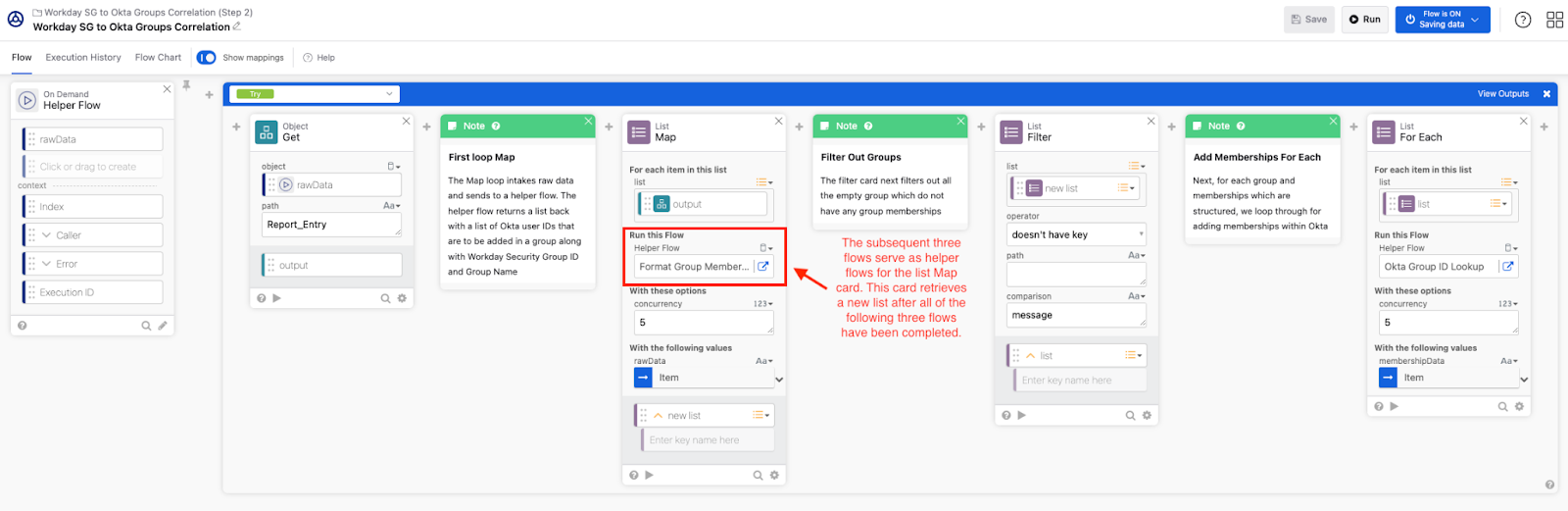
The auxiliary flow outlined below serves to acquire raw data and subsequently employs mapping techniques (utilizing a List Map) to extract pertinent details such as group names, owners, and UUIDs exclusively. This curated list of information is subsequently forwarded to the second loop (For Each), where the Okta Groups creation process ensues.
The first loop (List Map) is shown below
In the second loop (For Each), depicted below, I initiate the creation of Okta groups within the Universal Directory (UD). Concurrently, for every group successfully created in Okta UD, I generate a corresponding entry in the Okta Workflows table to establish a reference point during each aggregation process. This strategic reference to the workflow table serves a dual purpose: firstly, it mitigates redundant calls to create groups in Okta by verifying the existence of the group prior to initiation. Secondly, in cases of metadata modifications such as alterations in group name or ownership, this table acts as a vital resource. By referencing the workflow table, delta changes can be effectively applied by updating the relevant group entries in Okta UD, thereby necessitating the utilization of a Workday Security Group immutable UUID for accurate tracking and management.

Below is the Okta workflow table populated with group metadata after conclusion of above workflows:

Here is an example of the group created as a result of the workflow in Okta Universal Directory (UD):


[Step 3] Associate memberships with Okta’s equivalent Workday Security Groups, mirroring the data obtained from the RAAS report.
Moving forward, with the successful creation of the groups, we proceed to the next phase involving a second set of workflows.
For simplicity, following is what the workflow is doing: The workflow serves as a custom connector designed to streamline the aggregation of user group memberships from the RAAS report to Workday security groups. It facilitates the synchronization of these memberships with equivalent Okta groups. Additionally, the connector offers functionality to aggregate data as necessary and apply delta changes to memberships. These changes encompass user additions or removals from groups, as well as the management of empty groups. This collection comprises a total of 8 parent and delegated flows. Let’s delve into each one in detail.
The workflow commences by invoking the token endpoint of Workday to obtain an access token. Subsequently, a GET request is made to the RAAS Report endpoint to retrieve the comprehensive report encompassing security groups and memberships. Finally, leveraging the raw data garnered from the API call, a child flow is initiated to further process the information.

The raw data undergoes processing via a helper flow. Initially, this flow organizes the data by querying members to Okta group IDs. Subsequently, it filters groups lacking memberships and triggers a workflow to incorporate memberships into the group.
The next helper flow consists of the following functionalities:
- Handling Empty Groups:
- If the group is empty, meaning it has no memberships, the helper flow streams the current group memberships. Utilizing a stream helper flow, it empties the group memberships accordingly.
- For empty groups, it flags a message indicating “emptyGroup,” which is then returned to the parent flow.
- Membership Email Lookup:
- It employs another helper flow to lookup membership emails for each group.
- This involves querying Okta for the user’s Okta ID as a list, which is then returned to the parent flow for further processing.

Below is the stream helper flow which empties the group

Below if the helper flow to lookup Okta User ID based on user email

The image below indicates where we are so far, and where we are going next

The following helper flow performs the following actions:
- It looks up the oktaGroupId from our workflow table.
- Upon obtaining the oktaGroupId, it calls another helper flow with the user list and oktaGroupId to add memberships to the group.
- After the latest group memberships are added, it lists the group members and streams them to another steam helper flow.

Below is the helper that adds members to the Okta group

Below is the stream helper flow which for each streamed membership compares the new list of membership from RAAS report. If there is a match, the memberships are retained, else the user is removed from the group

Finally, we have the group memberships reflected in the Okta’s UD group as shown below:


[Step 4] Initiate the campaign to review user access to Security Groups.
Finally we can launch a user access reviews owner campaign on these groups, which look like as follows:

Now, as an owner, I have the ability to take Approve or Revoke action on each user’s memberships to Workday’s Security Groups. To enhance this capability, you can build a workflow to perform automated remediation of revoked access using Workday’s SOAP API for security group membership remediation after your access certification campaign. This automated process ensures swift and efficient management of access rights, reducing manual intervention and enhancing overall security posture.
Conclusion
In conclusion, the governance of Workday’s security groups using Okta Identity Governance (OIG) represents a crucial step in ensuring the security and compliance of organizational data and systems. Despite the challenges posed by the lack of native support for importing Workday’s security groups directly into Okta, innovative solutions such as custom Okta workflow connectors can be developed to bridge this gap.
By leveraging custom Okta workflows, organizations can effectively aggregate Workday security groups and memberships within Okta, enabling seamless governance and compliance enforcement. This integration empowers organizations to proactively conduct user access reviews, ensuring that access privileges align with organizational policies and regulatory requirements.
Furthermore, the ability to govern Workday’s security groups with Okta OIG not only enhances security posture but also strengthens compliance efforts. By maintaining accurate and up-to-date records of group memberships, organizations can demonstrate compliance with regulatory standards and undergo audit processes with confidence.
In today’s digital landscape, where safeguarding organizational assets and maintaining compliance are paramount, the governance of Workday’s security groups plays a crucial role in mitigating risks and ensuring the integrity of organizational data. Therefore, investing in robust governance solutions, such as those provided by Okta OIG, is essential for organizations looking to stay ahead in an ever-evolving security and regulatory landscape.

 IAMSE
IAMSE